Managing privacy in Cubby: what your circle sees, what stays yours
When you log personal health data and your baby's daily care in the same app and share it with family, privacy is not a minor concern. It is reasonable to want a clear picture of who sees what before you add anyone. This article walks through how Cubby's privacy model actually works, layer by layer.
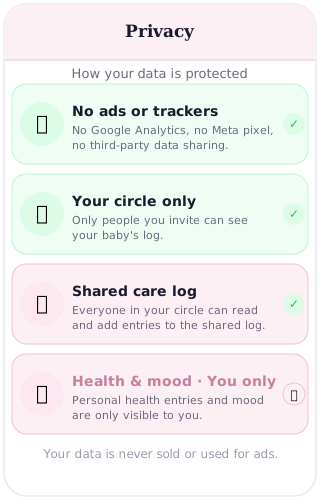
Privacy starts before the app opens
Before getting into what your circle can see, it is worth establishing what no one outside Cubby can see. Cubby has no ads, no third-party tracking, and no analytics pixels. Nothing you log is passed to an ad platform or a data broker. The assumption built into the product from the start is that this is private family data and it stays that way.
If you want the full detail on how Cubby handles your data at the infrastructure level, the Cubby privacy article covers it. This article focuses on what happens within Cubby, between you and the people you invite.
Your circle is your privacy boundary
The circle is the only door into your baby's data. No one can see your log, your baby's milestones, your medicine entries, or anything else unless you explicitly send them an invitation and they accept it.
There is no public profile. There is no social feed. There is no "discover" feature that might surface your baby to strangers. The circle is invitation-only and entirely under your control. Not grandparents, not your employer, not Cubby's team can see your log unless you have added them. The circle is the entire privacy perimeter.
What circle members can see and do
Once someone is in the circle, they have full access to the shared log. That means they can see every feed entry, every nappy, every nap, every medicine log, every weight entry, every milestone, and every note in the log. They can also add new entries themselves. If your partner logs a 3am feed, you see it. If your mother logs a nappy change while she is minding the baby, you see it too.
This is deliberate. The shared log is designed to give everyone involved in your baby's care the same real-time picture. It is what makes coordinated care work without constant check-in calls.
What circle members cannot see: your personal health entries and your mood tracking. These are never shared with the circle, no matter who is in it.
The personal layer: what only you see
Some data in Cubby belongs to the person logging it, not to the baby's shared record. Personal health entries and mood tracking stay with the individual who logged them. Even if your partner, your nanny and your mother-in-law are all in the circle, none of them can see your personal mood or health data.
This matters for a straightforward reason. A parent who is having a hard week emotionally should be able to track that honestly, for themselves, without it becoming visible to everyone helping with the baby. The shared log is for the baby. The personal layer is yours.
Managing who is in the circle: the practical questions
Because circle membership is all-or-nothing per person, the main privacy decision is who you add in the first place. Here are the situations that come up most often.
Nanny and partner together. Both are in the circle and see the same data. Your nanny sees every note you write, including the ones that were really meant for your partner ("I left soup in the fridge, love you"). Think about what you log before you add someone whose relationship with you is professional rather than personal. Notes in the shared log are not targetable at one person.
Grandparents. Grandparents are generally a natural fit for the circle. They need to know the day's feeds and routine when they are caring for the baby, and being able to log entries themselves is useful when they are on duty. Having grandparents in the circle also means they feel included in daily life even if they are not nearby.
Co-parenting and shared custody. If you add a co-parent to the circle, they see everything in the shared log across all days, not just the days the baby is with them. For many co-parents this builds trust and removes the need for detailed handover calls. For others, having full mutual visibility feels like more exposure than they want. There is no wrong answer. Some co-parents use the circle for continuity; others prefer a brief handover note instead. That choice is yours.
Removing someone. If a nanny leaves, or a situation changes, you can remove that person from the circle. They lose access going forward. Historical entries they made while in the circle remain in your log as a care record. Removing someone is immediate and straightforward.
The honest limits
It is worth being clear about what Cubby does not currently do.
There is no per-member permission setting. You cannot make someone view-only, or hide specific sections from one person while sharing them with another. If you add someone to the circle, they see and can log everything in the shared record. The all-or-nothing model is simpler to understand but it does mean the circle list itself is your main privacy tool.
Notes in the shared log are visible to all circle members. There is no way to write a note that only one person sees.
Email addresses of circle members are visible within the circle. This is by design, for identification purposes, but it is worth knowing before you add someone. Everyone in your circle can see the email addresses of everyone else who is in it.
The practical takeaway
Managing privacy in Cubby is mostly about managing the circle list thoughtfully. Add the people who genuinely need access to your baby's daily record. Remove people when that changes. Know that your personal mood and health data is yours alone and will never appear in the shared log. Know that everything else in the shared log is visible to everyone in the circle.
That is the model. It is simpler and more honest than most apps, and it puts the control where it belongs: with you.
Frequently asked questions
Can I set different privacy levels for different circle members?
Not currently. Cubby's circle works on an all-or-nothing basis per person. Everyone you add can see the same shared log and can add entries to it. There is no view-only mode or per-member permission setting. Managing privacy means deciding carefully who you add to the circle, rather than configuring individual access levels.
Can my nanny see my personal notes or mood entries?
No. Personal health entries and mood tracking are visible only to the person who logged them. Your nanny can see everything in the shared log — feeds, nappies, naps, medicines, milestones — but not your personal mood or health data. Notes added to the shared log are visible to everyone in the circle, so bear that in mind when writing them.
If I add my co-parent to the circle, can they see everything?
They can see everything in the shared log — every feed, nappy, nap, medicine entry, weight update, milestone and note. They cannot see your personal health or mood entries, which are visible only to you. Adding a co-parent to the circle gives them the same view of the baby log as any other circle member.
What happens to a circle member's data access if I remove them?
When you remove someone from the circle, they lose access to your baby's data going forward. They can no longer see the log or add new entries. Historical entries they made while in the circle remain in your log — those records stay with you.
Is my personal health and mood data visible to my partner in the circle?
No. Personal health and mood entries are only ever visible to the person who logged them — they are not shared with anyone in the circle, including your partner. This is by design. The shared log covers the baby. Your personal health and mood data is yours alone.
The circle is yours to manage
Add carefully, remove easily. No ads, no trackers, no public profiles.
Start free