The Cubby family circle: how shared care actually works
Think about who is caring for your baby today. Maybe four different people. Mum went back to work at 8am. Dad did the school run and then his own day. Nana has the baby until 3pm. The nanny covers 3 until 7. Each of them knows a fragment of what happened. Nana knows the baby had a feed at 10 and a short nap after that. The nanny arrives not knowing any of it, and has to piece together the morning from whatever Nana can remember to say on her way out the door. Dad gets home at 7 and asks how the day went, and by that point nobody quite has the whole picture.
This is the coordination problem that every family with shared care hits. It is not a failure of anyone involved. It is a structural problem: the information about your baby's day lives in four different people's heads, and there is no reliable way to move it between them in real time.
The Cubby family circle is built to fix exactly that.
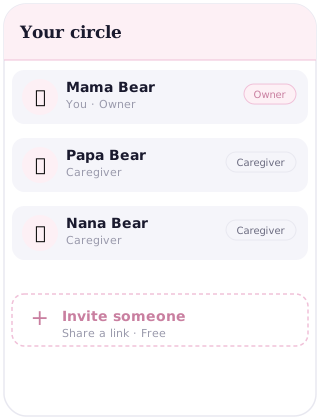
What the circle is
The family circle is not a group chat. It is not a shared spreadsheet. It is a single live log that every member of the circle can both read and write. The moment someone logs a feed, a nappy change, a nap, or anything else, every other member of the circle sees it on their phone straight away. The log is shared and it is live. There is no syncing delay, no manual update, no "let me know what happened today" at the end of a shift.
This matters because the value of a care log depends entirely on whether it is current. A log that is 30 minutes behind is useful. A log that depends on someone remembering to write a summary and send it is not really a log. The circle keeps the record honest because every entry appears the moment it is made.
Who you can add
The circle is for anyone who cares for your baby. That typically includes your partner, your parents or in-laws, a nanny, a helper, a maternity nurse, or an au pair. Some families include a sibling who helps at weekends. Some include a grandparent who is in a different city and just wants to stay close to the day.
There is no fixed list of roles. If someone spends time with your baby and you want them to be part of the record, they belong in the circle.
What circle members can see
Every entry in the shared log is visible to everyone in the circle. Feeds (breast, bottle or formula, with amounts and durations), nappy changes, naps, medicines with dose and time, weight and height measurements, milestones and notes. The log is one record, not separate silos for different caregivers.
Cubby gives you privacy controls so you can manage what is shared within your circle. The daily care log is shared by default so caregivers are always informed. Sensitive entries can be managed at your discretion.
What circle members can do
Every member of the circle can log on behalf of the baby, not just read what others have logged. The feed the nanny gave at 4pm goes into the shared record. The nap that happened at Nana's house goes in too. A medicine dose logged by your partner at 7am is there when the nanny arrives at 9 and needs to know what has already been given.
This is the part that makes the circle genuinely useful for shared care, rather than just convenient for one person. Every caregiver contributes to the same record. Nobody is waiting on a text from someone else to find out what happened.
Why it is better than a group chat
When a new baby arrives, the natural move is to start a WhatsApp group. It works for a few days. Then someone says "she had her bottle at 2" and that message is buried under seventeen other messages by the time the next caregiver needs it. You cannot search a group chat for "last feed time." You cannot see a week's worth of feeding patterns in a thread. You cannot show a group chat to a paediatrician and ask them to interpret it.
A group chat is a conversation. A care log is a record. They are different things, and the family circle is built to be the record. It is structured, searchable and permanent. Every entry has a timestamp. You can scroll back through any day and see exactly what happened and when. At a medical appointment you can pull up the last two weeks of feeds and nappies without having to reconstruct anything from memory.
A day in the life with the circle
Here is what a typical shared-care day looks like when the circle is working. Mum logs the 6am feed before she leaves for work. Dad sees it on his phone and knows the baby is fed for now. He hands over to Nana at 9, and because the log is current, Nana can see the whole morning without needing a verbal briefing. At 11am Nana logs a feed and a nappy change. At 1pm she logs the nap start time, and when the baby wakes at 2:30 she logs the end.
The nanny arrives at 3pm to take over. She opens Cubby and sees exactly where things are: the last feed was at 11, the nap was 1 to 2:30, no medicines today. She does not have to ask Nana. She does not need a note on the counter. The record is current and it is right there. She logs the 4pm bottle and a nappy at 5:30. When Dad comes home at 7 and picks up the baby, he opens Cubby before walking in the door and already knows how the day went. The handover takes 30 seconds because the log did the work.
Frequently asked questions
How do I add someone to my Cubby circle?
Open Cubby and go to your family circle settings. You can invite anyone by sharing a join link or entering their details directly. Once they accept, they have access to the shared log and can read and log entries straight away.
Can circle members see everything, including private notes?
Cubby gives you privacy controls so you can manage what is shared within your circle. The daily care log is shared by default so every caregiver stays informed, but you have the ability to manage access for sensitive entries.
What if someone in the circle logs something incorrectly?
Entries in Cubby can be edited after they are logged. If a caregiver records the wrong time, amount or type, you can correct it. The log shows who made each entry and when, so it is easy to spot and fix a mistake.
Can I remove someone from the circle?
Yes. You can remove a circle member at any time from the family circle settings. Once removed, they no longer have access to the log. Entries they previously made remain in the record.
Do circle members need a Cubby account?
Yes, each person in the circle needs their own Cubby account. Setting one up is free and takes under a minute. Because Cubby is a progressive web app, there is nothing to download from an app store.