Pregnancy tracking in Cubby: from your first scan to your due date
The pregnancy phase problem
Most baby tracking apps start at birth. Which means that for the nine months before your baby arrives, you are on your own. You track your pregnancy in one app, manage your scan dates somewhere else, log symptoms in the notes app on your phone, and share updates with your partner via WhatsApp. Then your baby arrives and you start over in a completely different app, with no history and a new login to learn.
This is the norm. It should not be.
Cubby starts at pregnancy. The same account, the same family circle, the same habit of logging, from before your 12-week scan through your baby's first years. There is no starting over.
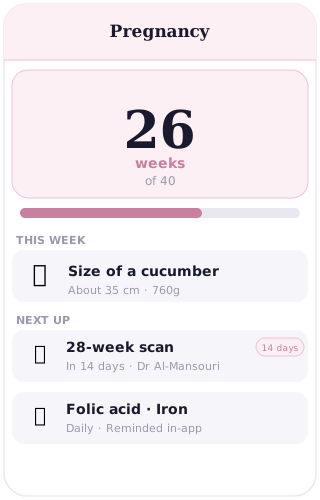
What Cubby does during pregnancy
When you set up Cubby, you enter your due date. The app immediately shows you where you are in your pregnancy and what is happening this week. Each week brings an update on your baby's development: how big they are, what systems are forming, what changes you might notice in your body. The content is drawn from established health sources and written to inform, not to alarm.
You also get a due date countdown, which sounds like a small thing until you are 34 weeks and someone asks how long you have left and you want a precise answer rather than an approximation.
You can log symptoms as they come up: nausea, tiredness, movement, backache, anything you want to track. Each entry is timestamped. Over weeks you can see patterns, and at your midwife or antenatal appointments you have a real record to share rather than a reconstruction from memory.
Scan dates can be noted so you have a reminder before each appointment. There is also a place to add other key dates and notes as your pregnancy progresses.
The partner in pregnancy
The Cubby family circle starts at pregnancy, not at birth. From the moment you set up your account, you can invite your partner in. They see the same week-by-week updates on their own device. They see the symptoms you have logged. They know where you are in the pregnancy without you having to brief them every time.
This matters more than it might seem. Pregnancy can feel isolating in ways that are hard to explain. A partner who is in the same loop, reading the same updates, seeing the same milestones, is a partner who is genuinely present rather than informed after the fact.
The circle you build during pregnancy is the same circle that logs feeds and nappies after your baby arrives. You are not starting a new structure. You are continuing an existing one.
420+ articles during pregnancy
Cubby's article library is available from the first week of pregnancy, not just from birth. The 12-week scan and what to expect from it. Your booking appointment and what the midwife will ask. How to tell your employer you are pregnant. What to look for in an antenatal class. Nutrition in the first trimester. What the anomaly scan checks for.
All of it is there, written to give you a clear and calm answer to the question you actually have, without a spiral of forum posts and conflicting opinions.
The transition
When your baby arrives, you do not switch apps or accounts. You switch from the pregnancy view to the baby view. Your due date becomes a birthday. The week-by-week pregnancy updates give way to the baby log. Your symptom history stays. The family circle is already there, already invited, already in the habit of using the app.
That last part is underrated. Building the habit of logging during pregnancy means you are not trying to establish it in the first weeks with a newborn, when everything else is also new. The habit is already there. You just switch what you are logging.
Being honest about what Cubby is
Cubby's pregnancy tracking is a companion, not a diagnostic tool. The week-by-week content is general and educational. It tells you what is typically happening at this stage of pregnancy. Your pregnancy is specific, and your midwife or obstetrician is the authority on it. If something feels wrong, call your clinical team. Cubby is the information and the log; your clinical team is the care.
Frequently asked questions
Can I start using Cubby during pregnancy before my baby is born?
Yes. You enter your due date when you set up your account and Cubby immediately shows you week-by-week updates, a due date countdown, a symptom log and access to the full article library. You do not need to wait until birth.
Does Cubby track my symptoms during pregnancy?
Yes. You can log symptoms throughout pregnancy with a timestamp, so you have a record to bring to your midwife or obstetrician appointments rather than trying to recall details from memory.
Can my partner see my pregnancy updates in Cubby?
Yes. The family circle starts at pregnancy. You can invite your partner from the moment you set up your account. They see the same week-by-week updates and logged entries on their own device.
What happens to my pregnancy data when I switch to baby mode?
Nothing is lost. The app transitions from the pregnancy view to the baby log view when your baby arrives. Your symptom history, notes and logged dates stay in the same account. The family circle is already in place.
Does Cubby have content for every week of pregnancy?
Yes. Cubby includes week-by-week updates from early pregnancy through to your due date, covering your baby's development and what to expect from your body at each stage. These are general educational guides; your midwife or obstetrician remains the authority on your specific pregnancy.
Start at pregnancy. Stay through baby.
One account. No starting over. Your whole journey in one place.
Start free