The Cubby nanny handover: what to log, what to share, how to structure your day
The night before your nanny starts, you probably have a list in your head. What time the morning feed usually happens. How long the first nap tends to go. Which side to start on if you are breastfeeding. What medicine is due and when. That list is in your head because you have been the one holding it. Tomorrow, someone else will need it too.
This is the article for that night. Here is how to set up Cubby before your nanny arrives, what to show them on the first morning, and how the handover works once the system is running.
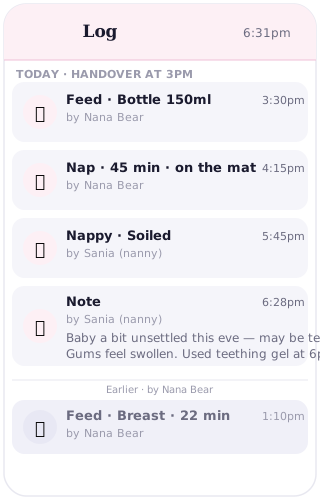
Before the nanny arrives
The most important thing to do before day one is add your nanny to the family circle. In Cubby, open the circle settings, tap the option to invite a new member, and enter your nanny's name and contact details. They will get an invitation and can join in one step. This takes about two minutes and it means they arrive already connected to the live log.
Before your nanny arrives that first morning, log whatever has happened already: the overnight feeds, the morning feed, the nappy change, whether your baby slept. When your nanny opens Cubby, they will see the morning so far laid out in front of them. They know when the last feed was without asking. They can see how long the morning nap went. They arrive informed.
The morning handover
Instead of a verbal briefing or a handover sheet, open Cubby with your nanny on that first morning and walk through what they are looking at. Here is the log. Here is what happened this morning. Here is how to log a feed. That last one takes about 30 seconds to demonstrate, and another 30 seconds for them to try.
Show them the three things they will use most: how to log a feed, how to log a nappy, how to log a nap. Those three cover almost everything that happens in a day. Everything else they can figure out as it comes up, or you can cover it on day two.
The goal is for your nanny to feel confident before you leave, not fluent in the whole app. Confident means: I know where to find the log and I know how to add an entry. That is enough.
What the nanny should log
Brief your nanny to log as they go, not at the end of the day. A feed logged immediately after it happens has an accurate time. A feed logged at 5pm from memory might be off by an hour. The accuracy matters more than it sounds, because medicine timing, nap timing and feed patterns all connect.
The core things to log each day: every feed, including type (breast, bottle, formula), amount if it is a bottle, and duration if it is a breastfeed. Every nappy change, noting whether it was wet, dirty or both. Every nap, with start time and end time. Any medicine given, with the name, the dose, and the exact time. If something unusual happens during the day, a note in the log is the right place for it.
The standard for a good log day is: anyone picking up from your nanny at the end of the day should be able to read the log and know exactly what happened, without needing to ask.
What you see at work
This is the part that changes things. While you are at work, you can open Cubby and see exactly what has happened since you left. The 9am feed. The 10:30 nap that ran long. The nappy change at noon. You can see it in real time.
You do not need to text your nanny asking for updates. You do not need to wonder whether the afternoon nap has happened yet. You open the log and it is there. For most parents returning to work, this is the thing that makes the biggest difference to the day: you are not cut off from what is happening at home.
End of day
When you come home, you already know the day. The verbal handover is shorter because you are not starting from scratch. You are not asking whether the afternoon feed happened, or whether the nap was long or short. You know. The conversation can be about anything that the log does not capture: how your baby seemed, whether something felt off, anything your nanny noticed.
Parents who use Cubby with a nanny consistently say the same thing: the end-of-day handover went from 15 minutes to 5. The log did most of it already.
Medicines: the most important part
If there is any medicine to give during the day, this is where the log earns its place most clearly. Log it before you leave: the medicine name, the dose, and the time it is due. Brief your nanny to log it immediately when they give it, with the exact time.
Both you and your nanny can see that entry in real time. If you are ever uncertain whether a dose has been given, you open the log. The timestamp is there. Double-dosing does not happen by accident when there is a live log that everyone can see.
Frequently asked questions
How do I add my nanny to Cubby?
Open Cubby, go to your family circle settings, and tap the option to invite a new member. Enter your nanny's name and contact details. They will receive an invitation and can join in one step. The whole process takes about two minutes.
What if my nanny forgets to log something?
Log entries can be added with a backdated time, so a missed feed can be added later with the correct timestamp. Brief your nanny to log as they go rather than at the end of the day — it is much less likely that anything gets missed that way.
Can I message my nanny through Cubby?
Cubby is a care log, not a messaging app. For messages and instructions, use whatever you normally use. Cubby handles the log of what actually happens during the day.
How much does the nanny need to know about Cubby before starting?
Very little. A five-minute walkthrough on the first morning is usually enough. Show them how to log a feed, a nappy and a nap, and they have the core of it. Everything else can be learned as it comes up.
Should I print a backup handover sheet or trust Cubby alone?
Most families stop using a paper sheet once Cubby is running, because the live log is more accurate than anything written hours earlier. For the very first day, a printed note covering the basics can help. After that, the log speaks for itself.
Set up the handover before day one
Add your nanny to the circle in 2 minutes. They log the day. You see it in real time.
Start free