How to prepare for your baby's doctor appointment using Cubby
You waited three days for this appointment. The doctor has 8 minutes. They ask when the fever started and your answer is "Monday? Or maybe Sunday night?" They ask what medicines you have given and you try to reconstruct the past two days from memory. They ask how often the cough is happening and you say "a lot." None of these answers help the doctor make a good decision.
The Cubby log is the answer to all three questions, if you have been using it. Here is how to make sure you walk into that 8-minute appointment with everything the doctor needs.
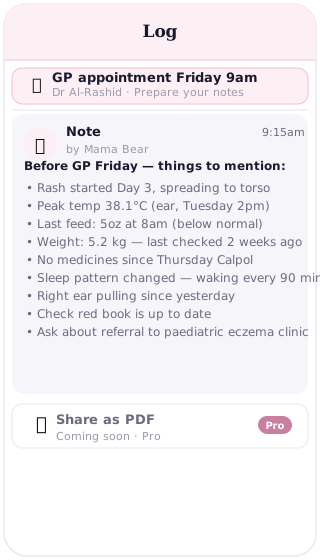
The consulting room problem
Doctors are good at working with limited information. But limited information produces limited certainty, which often means a more cautious diagnosis, more follow-up tests, or a "watch and wait" plan that could have been more specific with better data. When a parent walks in with a clear, timestamped account of what has happened, the appointment becomes a different conversation.
The problem is not that parents do not pay attention. The problem is that caring for a sick baby for 48 hours while running on fragmented sleep and worry is not a situation that produces reliable memory. You remember that the fever was high on Monday morning. You do not remember exactly when you gave the paracetamol, or whether it was Calpol 2.5ml or 5ml, or whether the cough started before or after the fever. These details matter and they are genuinely hard to hold.
The log holds them instead.
What to have ready when you walk in
Doctors typically need to know when symptoms started, what temperatures you measured and when, which medicines you gave and at what doses, how feeding has changed, whether there have been any weight changes, and whether vaccinations are up to date. If you have been logging in Cubby, every one of these answers is already there.
The notes section holds symptoms and temperature readings, each with a timestamp. The medicine log holds every dose you gave, with the name, the amount, and the time. The feed log shows you today's feeds against previous days, so you can say "she normally has 6 feeds, she has had 3 today" rather than "she has not been eating much." The weight log has the last recorded weight from the clinic or home scale. The vaccine log shows exactly what has been given and when.
You do not need to prepare a summary before every appointment. With the log open in the consulting room, you can scroll to the relevant section and the information is there. But for appointments about an ongoing illness, a short pre-appointment note helps.
The pre-appointment note
Before you leave for the appointment, spend two minutes writing a summary note in Cubby. Pull the thread together in plain language. Something like: "Fever started Sunday evening, first reading 38.1°C. Rose to 39.2°C by Monday morning. Given Calpol 2.5ml at 08:00, 14:00, and 20:00 on Monday and Tuesday. Appetite reduced — roughly half normal feeds since Monday. Cough present since Monday, worse at night. No rash. Last weight: 6.2kg at 8-week check."
That note takes about 90 seconds to write. In the consulting room, you can open it and read it out, or hand your phone to the doctor. It gives them the narrative they need before they have asked a single question. The rest of the appointment can be about their assessment, not reconstructing what happened.
Your circle sees it too
If your partner, a grandparent, or a nanny is the one taking the baby to the appointment instead of you, they can open Cubby and see exactly the same log. There is no handover call where you try to remember everything and they try to write it down. No WhatsApp thread of symptoms. No risk that the person sitting in front of the doctor does not know what medicine was given this morning.
Everyone in your Cubby circle sees the live log in real time. The person at the appointment has the same information as the person who was up at 3am taking temperatures. That is a genuinely useful property when sick-baby care is shared across more than one person.
After the appointment
The appointment is also an opportunity to add to the record. What did the doctor say? What new medicine was prescribed? Is there a follow-up visit if things do not improve? A short note in Cubby before you get to the car captures all of this while it is fresh. See the companion article, what to log in Cubby after a baby's doctor appointment, for exactly what to write.
The PDF (coming soon)
A PDF export of the log for doctor visits is coming in Cubby Pro. Until then, opening the app in the consulting room works well. Doctors are used to patients showing them their phone, and a scrollable timestamped log with notes, medicine doses, and feed counts is considerably more useful than a verbal summary from a sleep-deprived parent.
Frequently asked questions
What information should I have ready for a baby's doctor appointment?
The most useful things to have ready are: when symptoms started, any temperature readings and when they occurred, which medicines you have given and at what doses and times, how feeding has changed compared to normal, recent weight, and whether vaccinations are up to date. If you have been logging in Cubby, all of this is already there.
Can I show the Cubby log to my doctor on my phone?
Yes. Open Cubby on your phone and scroll through the relevant sections during the appointment. Doctors are accustomed to patients showing them information on their phones. A summary note written before you leave for the appointment gives you a single clear entry to read from.
How far back should I look in the Cubby log before an appointment?
For a sick visit, look back to when symptoms first appeared — often 2 to 5 days. Check the notes for the first mention, the medicine log for everything you have given, and the feed log to see if intake has changed. For a routine check-up, the last weight entry and the vaccine log are the most useful things to have visible.
What if the other parent is taking the baby — can they see the log?
Yes. Anyone in your Cubby family circle sees the same log in real time. If you have been logging the past few days but your partner is taking the baby to the appointment, they can open Cubby and see everything. There is no briefing call needed.
Is there a way to export the Cubby log for the doctor?
A PDF export of the log for doctor visits is coming in Cubby Pro. Until then, opening the app in the consulting room works well. Most doctors are happy to read from your phone, and a timestamped log is more useful than a verbal account from memory.
The log is your prep
Start logging symptoms now. The appointment will be a better use of 8 minutes. No app store needed — works on any phone or browser.
Start free